HOW TO MAKE CUSTOM CURSOR IN CSS | ACTIVITY 05 |- Coding Lovers
Description: Creating a custom mouse cursor with CSS
The cursor CSS property sets the mouse cursor, if any, to show when the mouse pointer is over an element. how to create cursor property in css , how to create cursor property in html.
The cursor setting should inform users of the mouse operations that can be performed at the current location, including: text selection, activating help or context menus, copying content, resizing tables, and so on. You can specify either the type of cursor using a keyword, or load a specific icon to use (with optional fallback images and mandatory keyword as a final fallback).
keyword
A keyword value must be specified, indicating either the type of cursor to use, or the fallback cursor to use if all specified icons fail to load. how to make custom cursor in roblox studio , how to make custom cursor in roblox , how to make custom cursor yellow circle, how to make custom cursor click effect. how to create custom cursor , how to make moving cursor in css, how to create custom cursor in css, how to make custom cursor in scratch , how to make custom cursor in html.
The available keywords are listed in the table below. Other than none, which means no cursor, there is an image showing how the cursors used to be rendered. You can hover your mouse over the table rows to see the effect of the different cursor keyword values on your browser today. how to create custom mouse cursor in windows 10 , how to create custom mouse cursor in windows 11, how to make custom cursor in roblox studio 2023 , how to create custom cursor using css.
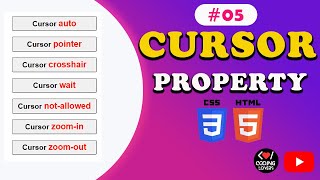
Auto - The platform-dependent default cursor. Typically an arrow.
Pointer - The cursor is a pointer that indicates a link. Typically an image of a pointing hand.
Crosshair - Cross cursor, often used to indicate selection in a bitmap.
Wait - The program is busy, and the user can't interact with the interface (in contrast to progress). Sometimes an image of an hourglass or a watch.
not-allowed - The requested action will not be carried out.
Zoom-in - The cursor indicates that something can be zoomed in
Zoom-out - Something can be zoomed (magnified) in or out.
#cursor
#css
#webdevelopment
#coding
#codinglovers
Coding Lovers Close description