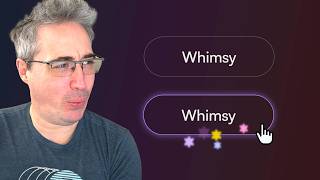
The most fun I've had with CSS in a while thanks to offset-path
Description: 👉 Start writing CSS with confidence: https://thecascade.dev/courses/css-demystified/?utm_source=youtube&utm_medium=social&utm_campaign=regular-video
🔗 Links
✅ Finished version: https://codepen.io/editor/kevinpowell/pen/019edbf1-79cb-739e-a285-9780858eb92e
✉ Keep up to date with everything I'm up to https://www.kevinpowell.co/newsletter
💬 Come hang out with other devs in my Discord Community https://discord.gg/nTYCvrK
⭐ Are you a beginner? HTML & CSS for absolute beginners is for you: https://learn.kevinpowell.co
🎓 Start writing CSS with confidence with CSS Demystified: https://cssdemystified.com
🚀 Already mastered CSS? Check out my advanced course, Beyond CSS: https://www.beyondcss.dev/
---
Help support my channel
👨🎓 Get a course: https://www.kevinpowell.co/courses
👕 Buy a shirt: https://cottonbureau.com/people/kevin-powell
💖 Support me on Patreon: https://www.patreon.com/kevinpowell or through YT memberships: https://youtube.com/@KevinPowell/join
---
🧑💻 My editors:
In most videos, I’m using CodePen these days: https://codepen.io/ - with High Contrast Dark theme and the font Commit Mono
And if not CodePen, then I’m probably using Zed: https://zed.dev/ with the theme Ayu Dark, and the font ZedMono
In older videos, I was using VS Code - https://code.visualstudio.com/ with the theme One Dark Pro Var, and the font Cascadia
---
⌚ Timestamps:
00:00 - Intro
00:35 - The HTML and basic styling
02:00 - Getting an element placed on the border of another element
04:00 - Offset-rotate to prevent rotation
05:30 - Using pseudo-elements to make more of a star shape
06:30 - Adding translates to have it shift off the edge
08:30 - Creating an animation to fade the decoration in and out
11:15 - Controlling everything with custom properties
15:00 - Adding the other stars with more controls
---
I'm on some other places on the internet too!
If you'd like a behind the scenes and previews of what's coming up on my YouTube channel:
Bluesky: https://bsky.app/profile/kevinpowell.co
Codepen: https://codepen.io/kevinpowell/
Github: https://github.com/kevin-powell
---
And whatever you do, don't forget to keep on making your corner of the internet just a little bit more awesome!
#css Close description
🔗 Links
✅ Finished version: https://codepen.io/editor/kevinpowell/pen/019edbf1-79cb-739e-a285-9780858eb92e
✉ Keep up to date with everything I'm up to https://www.kevinpowell.co/newsletter
💬 Come hang out with other devs in my Discord Community https://discord.gg/nTYCvrK
⭐ Are you a beginner? HTML & CSS for absolute beginners is for you: https://learn.kevinpowell.co
🎓 Start writing CSS with confidence with CSS Demystified: https://cssdemystified.com
🚀 Already mastered CSS? Check out my advanced course, Beyond CSS: https://www.beyondcss.dev/
---
Help support my channel
👨🎓 Get a course: https://www.kevinpowell.co/courses
👕 Buy a shirt: https://cottonbureau.com/people/kevin-powell
💖 Support me on Patreon: https://www.patreon.com/kevinpowell or through YT memberships: https://youtube.com/@KevinPowell/join
---
🧑💻 My editors:
In most videos, I’m using CodePen these days: https://codepen.io/ - with High Contrast Dark theme and the font Commit Mono
And if not CodePen, then I’m probably using Zed: https://zed.dev/ with the theme Ayu Dark, and the font ZedMono
In older videos, I was using VS Code - https://code.visualstudio.com/ with the theme One Dark Pro Var, and the font Cascadia
---
⌚ Timestamps:
00:00 - Intro
00:35 - The HTML and basic styling
02:00 - Getting an element placed on the border of another element
04:00 - Offset-rotate to prevent rotation
05:30 - Using pseudo-elements to make more of a star shape
06:30 - Adding translates to have it shift off the edge
08:30 - Creating an animation to fade the decoration in and out
11:15 - Controlling everything with custom properties
15:00 - Adding the other stars with more controls
---
I'm on some other places on the internet too!
If you'd like a behind the scenes and previews of what's coming up on my YouTube channel:
Bluesky: https://bsky.app/profile/kevinpowell.co
Codepen: https://codepen.io/kevinpowell/
Github: https://github.com/kevin-powell
---
And whatever you do, don't forget to keep on making your corner of the internet just a little bit more awesome!
#css Close description