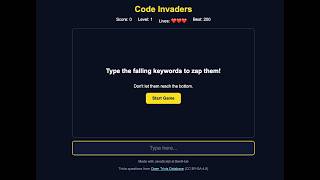
Code Invaders Part 2: Make the JavaScript Game Work | Game Loop, Typing & a Real API
Description: Our Code Invaders game screen is ready, now let's bring it to life with JavaScript! In this part we make keywords fall, zap them by typing, add levels and lives, load bonus trivia questions from a real API, and save the best score. 🚀
Tip: this part has a lot of code. Pause any time, use the chapters below to jump back, and read the step-by-step guide in this description while you code along.
🔗 Links
Open Trivia Database (free, no API key needed): https://opentdb.com
API helper (build your own question link): https://opentdb.com/api_config.php
The exact link we fetch in the video (copy and paste it):
https://opentdb.com/api.php?amount=10&category=18&type=multiple&encode=url3986
Open it in your browser to see the raw data the game receives!
What the link means:
amount=10 → get 10 questions
category=18 → Science: Computers
type=multiple → 4 answers per question
encode=url3986 → special characters arrive safely encoded, and decodeURIComponent turns them back into normal text
📘 How the game works, step by step
1. Grab the elements: document.querySelector finds the score, lives, screens and typing box, so JavaScript can change them.
2. Game variables: score, level, lives, speed and ticks hold the state of the game. gameTimer is null while the game is not running.
3. Best score: localStorage.getItem reads the saved best score. The first time, nothing is saved, so Number(null) gives 0.
4. showStats: puts the score, the level and the hearts on the page. "❤️".repeat(lives) makes one heart per life.
5. spawnWord: picks a random keyword with Math.random, creates a span with the word class, and places it at a random left position from 0 to 64 percent.
6. gameLoop: runs every 50 milliseconds. Every 40 ticks (2 seconds) a new word appears. Every word moves down by the speed. Words that reach the bottom are removed and cost one life.
7. startGame: resets everything and starts the loop with setInterval(gameLoop, 50).
8. endGame: clearInterval stops the loop, shows your score, and saves a new best score with localStorage.setItem.
9. Typing: the input event runs on every letter. trim and toLowerCase clean up what you typed, and find looks for a matching falling word. A match gets the zap class, disappears after 300 ms, and adds 10 points.
10. Levels: score % 100 === 0 means every 100 points. levelUp adds 1 to the level and 0.5 to the speed, so words fall faster.
11. Bonus round: showBonus pauses the game, takes the next question with shift, puts the correct answer in a random place with splice, and creates a button for each answer. The right answer gives an extra life.
12. loadQuestions: an async function that fetches the questions, turns them into an object with response.json, and decodes the text. If the internet is down, catch logs a friendly message and the game still works without bonus rounds.
🛠 Stuck? Common fixes
Nothing happens when you click Start Game → check that script.js is linked at the bottom of index.html, and open the Console (F12) to read the error.
Words don't get zapped → the words are lowercase, so check your toLowerCase and the spelling of the word list.
No bonus round → open the Console. If you see "Bonus questions could not be loaded", check your internet connection and the API link above.
To type the heart emoji: Windows key + period on Windows, Control + Command + Space on a Mac.
✅ What you'll learn:
✅ A real game loop with setInterval and clearInterval
✅ Arrays of objects with push, filter, find, shift and splice
✅ The input event, trim and toLowerCase
✅ Fetching a real API with async, await, try and catch
✅ Saving a best score with localStorage
🎯 Challenge: Add your own keywords to the word list, or make the game harder by changing the speed boost from 0.5 to 1. Tell me your best score in the comments!
▶️ Next: Part 3. We save the game with Git, push it to GitHub, and put it online for free with GitHub Pages.
⏱️ Chapters:
0:00 Intro
0:15 The plan
0:27 Grab the elements
1:01 Word list and game variables
1:34 Load the best score with localStorage
1:49 showStats and the hearts
2:16 spawnWord: random falling words
3:03 The game loop
3:58 startGame and setInterval
4:29 endGame
4:54 Test 1: words fall
5:12 Zap words with the input event
6:14 Test 2: zap!
6:22 Levels with the remainder operator
6:48 The bonus round
7:43 Fetch trivia from a real API
8:33 decodeURIComponent and try/catch
9:10 Final test
9:36 What you built, and Part 3
🔔 Subscribe to BentHub so you don't miss Part 3, where your game goes online for everyone to play!
Understand programming. Code with confidence.
#JavaScript #GameDev #WebDevelopment #CodingProject #LearnToCode #API #Programming #BentHub Close description
Tip: this part has a lot of code. Pause any time, use the chapters below to jump back, and read the step-by-step guide in this description while you code along.
🔗 Links
Open Trivia Database (free, no API key needed): https://opentdb.com
API helper (build your own question link): https://opentdb.com/api_config.php
The exact link we fetch in the video (copy and paste it):
https://opentdb.com/api.php?amount=10&category=18&type=multiple&encode=url3986
Open it in your browser to see the raw data the game receives!
What the link means:
amount=10 → get 10 questions
category=18 → Science: Computers
type=multiple → 4 answers per question
encode=url3986 → special characters arrive safely encoded, and decodeURIComponent turns them back into normal text
📘 How the game works, step by step
1. Grab the elements: document.querySelector finds the score, lives, screens and typing box, so JavaScript can change them.
2. Game variables: score, level, lives, speed and ticks hold the state of the game. gameTimer is null while the game is not running.
3. Best score: localStorage.getItem reads the saved best score. The first time, nothing is saved, so Number(null) gives 0.
4. showStats: puts the score, the level and the hearts on the page. "❤️".repeat(lives) makes one heart per life.
5. spawnWord: picks a random keyword with Math.random, creates a span with the word class, and places it at a random left position from 0 to 64 percent.
6. gameLoop: runs every 50 milliseconds. Every 40 ticks (2 seconds) a new word appears. Every word moves down by the speed. Words that reach the bottom are removed and cost one life.
7. startGame: resets everything and starts the loop with setInterval(gameLoop, 50).
8. endGame: clearInterval stops the loop, shows your score, and saves a new best score with localStorage.setItem.
9. Typing: the input event runs on every letter. trim and toLowerCase clean up what you typed, and find looks for a matching falling word. A match gets the zap class, disappears after 300 ms, and adds 10 points.
10. Levels: score % 100 === 0 means every 100 points. levelUp adds 1 to the level and 0.5 to the speed, so words fall faster.
11. Bonus round: showBonus pauses the game, takes the next question with shift, puts the correct answer in a random place with splice, and creates a button for each answer. The right answer gives an extra life.
12. loadQuestions: an async function that fetches the questions, turns them into an object with response.json, and decodes the text. If the internet is down, catch logs a friendly message and the game still works without bonus rounds.
🛠 Stuck? Common fixes
Nothing happens when you click Start Game → check that script.js is linked at the bottom of index.html, and open the Console (F12) to read the error.
Words don't get zapped → the words are lowercase, so check your toLowerCase and the spelling of the word list.
No bonus round → open the Console. If you see "Bonus questions could not be loaded", check your internet connection and the API link above.
To type the heart emoji: Windows key + period on Windows, Control + Command + Space on a Mac.
✅ What you'll learn:
✅ A real game loop with setInterval and clearInterval
✅ Arrays of objects with push, filter, find, shift and splice
✅ The input event, trim and toLowerCase
✅ Fetching a real API with async, await, try and catch
✅ Saving a best score with localStorage
🎯 Challenge: Add your own keywords to the word list, or make the game harder by changing the speed boost from 0.5 to 1. Tell me your best score in the comments!
▶️ Next: Part 3. We save the game with Git, push it to GitHub, and put it online for free with GitHub Pages.
⏱️ Chapters:
0:00 Intro
0:15 The plan
0:27 Grab the elements
1:01 Word list and game variables
1:34 Load the best score with localStorage
1:49 showStats and the hearts
2:16 spawnWord: random falling words
3:03 The game loop
3:58 startGame and setInterval
4:29 endGame
4:54 Test 1: words fall
5:12 Zap words with the input event
6:14 Test 2: zap!
6:22 Levels with the remainder operator
6:48 The bonus round
7:43 Fetch trivia from a real API
8:33 decodeURIComponent and try/catch
9:10 Final test
9:36 What you built, and Part 3
🔔 Subscribe to BentHub so you don't miss Part 3, where your game goes online for everyone to play!
Understand programming. Code with confidence.
#JavaScript #GameDev #WebDevelopment #CodingProject #LearnToCode #API #Programming #BentHub Close description