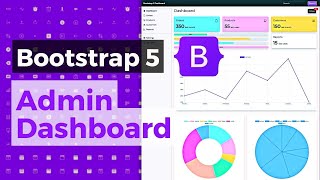
Bootstrap 5 Admin Dashboard Tutorial 📈
Description: How to Make a Responsive Admin Dashboard Website using Bootstrap 5, HTML, CSS & JavaScript Tutorial 📈
Bootstrap 5 Dashboard, Responsive Admin Dashboard, Build Admin Dashboard with Bootstrap 5, Dashboard using html css and javascript, How to make a responsive dashboard using bootstrap5, bootstrap admin dashboard tutorial, Admin Dashboard Landing Page.
In this tutorial I will show you how to make a Bootstrap 5 Admin Dashboard. This include Bootstrap Navbar, Sidebar, Side Menu, Bootstrap Card, Progress Bar, Canvas Line Chart, Doughnut Chart, Pie Chart, Bar Chart & Website Footer.
Resources I Used For This Tutorial:
- Visual Studio Code Editor
- Bootstrap 5
- Bootstrap Icons
- Google Fonts - Montserrat Family Font
- Bootstrap chart.js
You Might Like These Recommended Tutorials From The Channel:
- Bootstrap 5 Responsive Navbar | Bootstrap 5 Tutorial ► https://youtu.be/f5-0QKvyflQ?si=OWW9G2DN1qLSTNXE
- NETFLIX Clone using HTML CSS & Bootstrap 5 | Web Development Tutorial ► https://youtu.be/9z08mcZ2f-M?si=zqMJ2XMDne0gMUmY
- How to build Google Home Page Clone with HTML & CSS ► https://youtu.be/Ica4nfYHizQ?si=tFsezVJnWl1mDYv-
Channel Playlists:
- Web Development ► https://www.youtube.com/watch?v=aSLZLY5vtJA&list=PLw9iVI4U9ohTRMejOUbiJOh6AAJKS9nbj
- Bootstrap Websites ► https://www.youtube.com/watch?v=5xfeNKuaPOI&list=PLw9iVI4U9ohQxWIud9SwlyRO82loyi6YE
- Website Navigation Bars ► https://www.youtube.com/watch?v=aSLZLY5vtJA&list=PLw9iVI4U9ohRDKi6sxB-q7cd_ncaN3MJu
Blog Article Link ► https://coraionut.com/bootstrap-5-admin-dashboard-using-html-css-javascript/
Ionut Cora Web Development YouTube channel link ► https://www.youtube.com/@IonutCoraWebDev
Please subscribe and turn on the notifications bell, so you don't miss any future upload videos ► https://www.youtube.com/@IonutCoraWebDev?sub_confirmation=1
Social Media Links:
👉 Blog: https://coraionut.com/
👉 Instagram: https://www.instagram.com/ionutcora.webdev/
👉 TikTok: https://www.tiktok.com/@ionutcora.webdev
👉 Pinterest: https://www.pinterest.com/IonutCoraWebDev
Timestamps:
0:00 - Intro
2:00 - Project Set Up
4:45 - Header HTML
12:08 - Sidebar Navigation HTML
23:25 - Sidebar Navigation CSS
25:06 - Top Main HTML
29:25 - Cards Section HTML
32:45 - Cards Style
33:55 - Progress Bar HTML
40:30 - Progress Bar CSS
41:50 - Line Chart HTML
43:18 - Line Chart JavaScript
47:49 - Doughnut Chart & Pie Chart HTML
49:00 - Doughnut Chart JavaScript
55:09 - Pie Chart JavaScript
58:50 - Bar Chart HTML
59:30 - Bar Chart JavaScript
1:03:25 - Footer HTML
1:05:30 - Admin Dashboard Presentation
👍 Thanks for watching!
If you like my content and find it useful, please hit the Subscribe button.
#coding #dashboard #bootstrap Close description