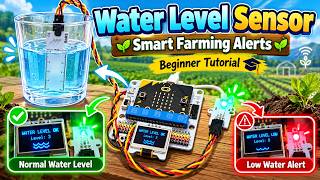
Water Level Sensor Tutorial | Smart Farming Alerts with ELECFREAKS
Description: Learn how to use a water level sensor with a BBC micro:bit and the ELECFREAKS Smart Agriculture Kit to create your very own smart water monitoring system!
In this beginner-friendly tutorial, I'll show you how to measure water levels and automatically trigger warnings when the water gets too high or too low. We'll use LED warning lights and an OLED screen to keep the farmer informed!
Imagine being able to monitor the water level in a farm's water trough, dam or storage tank without constantly checking it yourself!
💧 ** In this tutorial, you'll learn how to: **
- Understand how a water level sensor works
- Identify the components needed for the project
- Connect the water level sensor to a micro:bit using the ELECFREAKS Smart Agriculture Kit
- Program the sensor using Microsoft MakeCode
- Display water level readings on an OLED screen
- Set upper and lower water level thresholds
- Activate warning lights when water levels become too high or too low
- Display warning messages to alert the farmer
- Test the system using a cup of water to simulate a farm water supply
** Equipment needed: **
- Water container for testing
- BBC micro:bit
- ELECFREAKS Smart Agriculture Kit
- Water level sensor
- OLED display
- LED light
- Connection cables
🌱 ** Why is this useful in farming? **
Farmers need reliable access to water for their animals, crops and agricultural operations. Monitoring water levels can help identify when troughs or tanks are running low, prevent overflows and reduce the time spent manually checking water supplies.
By combining sensors, coding and automated alerts, we can create smarter farming systems that help farmers save time, conserve water and protect their livestock!
This project is perfect for students, teachers and beginners exploring smart agriculture, micro:bit programming, environmental monitoring and the Internet of Things (IoT).
Subscribe to **Geek Tutorials** for more hands-on coding projects, electronics tutorials and STEM activities!
#microbit #WaterLevelSensor #SmartFarming #ELECFREAKS #SmartAgriculture #MakeCode #GeekTutorials #STEMEducation Close description
In this beginner-friendly tutorial, I'll show you how to measure water levels and automatically trigger warnings when the water gets too high or too low. We'll use LED warning lights and an OLED screen to keep the farmer informed!
Imagine being able to monitor the water level in a farm's water trough, dam or storage tank without constantly checking it yourself!
💧 ** In this tutorial, you'll learn how to: **
- Understand how a water level sensor works
- Identify the components needed for the project
- Connect the water level sensor to a micro:bit using the ELECFREAKS Smart Agriculture Kit
- Program the sensor using Microsoft MakeCode
- Display water level readings on an OLED screen
- Set upper and lower water level thresholds
- Activate warning lights when water levels become too high or too low
- Display warning messages to alert the farmer
- Test the system using a cup of water to simulate a farm water supply
** Equipment needed: **
- Water container for testing
- BBC micro:bit
- ELECFREAKS Smart Agriculture Kit
- Water level sensor
- OLED display
- LED light
- Connection cables
🌱 ** Why is this useful in farming? **
Farmers need reliable access to water for their animals, crops and agricultural operations. Monitoring water levels can help identify when troughs or tanks are running low, prevent overflows and reduce the time spent manually checking water supplies.
By combining sensors, coding and automated alerts, we can create smarter farming systems that help farmers save time, conserve water and protect their livestock!
This project is perfect for students, teachers and beginners exploring smart agriculture, micro:bit programming, environmental monitoring and the Internet of Things (IoT).
Subscribe to **Geek Tutorials** for more hands-on coding projects, electronics tutorials and STEM activities!
#microbit #WaterLevelSensor #SmartFarming #ELECFREAKS #SmartAgriculture #MakeCode #GeekTutorials #STEMEducation Close description