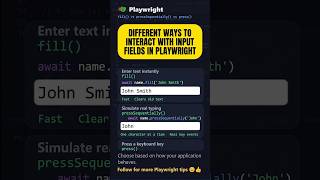
Playwright Input Actions Explained | fill() vs pressSequentially() vs press() #playwright
Description: In this video, learn the 3 different ways to interact with input fields in Playwright: fill(), pressSequentially(), and press().
🔹 fill(): Clears the input and pastes text instantly (ideal for standard login & text forms).
🔹 pressSequentially(): Types characters one by one with simulated delay (great for autocomplete, search dropdowns, and OTPs).
🔹 press(): Sends specific keyboard keys like Enter, Tab, Backspace, or keyboard shortcuts.
Master these input methods to write more reliable, flaky-free automation scripts!
🔔 Subscribe to QA Tech Bytes for bite-sized Playwright & QA automation tutorials!
#Playwright #TestAutomation #JavaScript #SoftwareTesting #Shorts #QATesting Close description