3D Developer Portfolio using HTML, CSS, JavaScript and Three JS with Source Code #threejs
Description: 3D Developer Portfolio using HTML, CSS, JavaScript and Three.js with Source Code
Visit Website - https://3dportfolionew-blush.vercel.app/
Download Source Code -
Source Code {This Project} - https://pixelwebtemplate.gumroad.com/l/wezmec
Source Code {All Projects} - https://pixelwebtemplate.gumroad.com/
Concept -
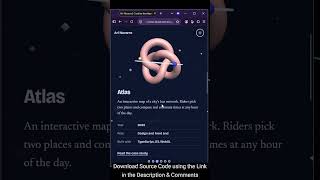
This is a single-page personal portfolio in the form of a 3D space you scroll through. Instead of stacking sections down a page, the camera flies along a curved path through a fog-filled world, and each section sits next to its own 3D object. It is built with plain HTML, CSS and JavaScript, plus Three.js for the 3D.
The visual style is deliberately not the usual dark-with-neon portfolio. It uses a pale glacier-blue background, deep navy text, and cobalt, butter-yellow and rose accents on the objects. Headlines are set in Bricolage Grotesque, and body text is in Newsreader, a serif.
Features
3D and motion
Scrolling moves the camera along a smooth path, and it lingers at each section so the text and object line up.
Objects grow into view as you approach them through the fog.
Each object gives a quick spin when you arrive at its section.
The scene shifts slightly with your mouse, which adds depth.
About 240 small floating shards fill the space between sections.
On load, the hero object assembles while the name slides up.
Navigation
A dot rail on the right edge shows where you are and jumps to any section. It moves to the bottom of the screen on phones.
A small name link appears in the corner once you scroll past the intro.
A scroll hint in the intro fades after you start scrolling.
Theming
Light and dark themes follow your system setting, and a toggle button switches between them.
Your choice is remembered, and the fog and wireframes in the 3D scene change colour to match.
Responsive layout
On desktop the text sits on the left and the object on the right.
On phones the object moves to the top half, and the text goes in a translucent panel below. The camera distance and object size adjust to fit.
Accessibility and robustness
Reduced-motion settings turn off idle animation, easing and the intro reveal, while scrolling still moves the camera.
Links and buttons have visible keyboard focus, and the 3D canvas is hidden from screen readers.
If WebGL or the Three.js library fails to load, the page still works as a normal readable page.
The rendering resolution is capped for performance, and the page needs no build step or local images.
Customizing it
Text: edit the HTML under the EDIT comment.
Object positions and order: change the O and makers values in the script.
Colors: change the tokens at the top of the CSS and the C palette in the script. Close description
Visit Website - https://3dportfolionew-blush.vercel.app/
Download Source Code -
Source Code {This Project} - https://pixelwebtemplate.gumroad.com/l/wezmec
Source Code {All Projects} - https://pixelwebtemplate.gumroad.com/
Concept -
This is a single-page personal portfolio in the form of a 3D space you scroll through. Instead of stacking sections down a page, the camera flies along a curved path through a fog-filled world, and each section sits next to its own 3D object. It is built with plain HTML, CSS and JavaScript, plus Three.js for the 3D.
The visual style is deliberately not the usual dark-with-neon portfolio. It uses a pale glacier-blue background, deep navy text, and cobalt, butter-yellow and rose accents on the objects. Headlines are set in Bricolage Grotesque, and body text is in Newsreader, a serif.
Features
3D and motion
Scrolling moves the camera along a smooth path, and it lingers at each section so the text and object line up.
Objects grow into view as you approach them through the fog.
Each object gives a quick spin when you arrive at its section.
The scene shifts slightly with your mouse, which adds depth.
About 240 small floating shards fill the space between sections.
On load, the hero object assembles while the name slides up.
Navigation
A dot rail on the right edge shows where you are and jumps to any section. It moves to the bottom of the screen on phones.
A small name link appears in the corner once you scroll past the intro.
A scroll hint in the intro fades after you start scrolling.
Theming
Light and dark themes follow your system setting, and a toggle button switches between them.
Your choice is remembered, and the fog and wireframes in the 3D scene change colour to match.
Responsive layout
On desktop the text sits on the left and the object on the right.
On phones the object moves to the top half, and the text goes in a translucent panel below. The camera distance and object size adjust to fit.
Accessibility and robustness
Reduced-motion settings turn off idle animation, easing and the intro reveal, while scrolling still moves the camera.
Links and buttons have visible keyboard focus, and the 3D canvas is hidden from screen readers.
If WebGL or the Three.js library fails to load, the page still works as a normal readable page.
The rendering resolution is capped for performance, and the page needs no build step or local images.
Customizing it
Text: edit the HTML under the EDIT comment.
Object positions and order: change the O and makers values in the script.
Colors: change the tokens at the top of the CSS and the C palette in the script. Close description