React JS Admin Dashboard Tutorial with Bootstrap 5 and Recharts 📊
Description: How to make a responsive Admin Dashboard using React JS, Bootstrap 5 and Recharts | Admin Panel from scratch for beginners 📊
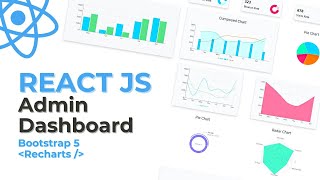
In this tutorial I will show you how to build a responsive admin dashboard with React, bootstrap and recharts. This admin panel contain the following components: Line Chart, Area Chart, Bar Chart, Composed Chart, Pie Chart, Radar Chart, Header, Sidebar Menu and Footer.
Admin Dashboard in React JS, admin dashboard Bootstrap 5, react admin panel, react admin dashboard tutorial, react admin panel from scratch, reactjs admin dashboard, reactjs admin dashboard with bootstrap, reactjs admin dashboard project, how to use recharts with react js, admin panel design, recharts react js, reactjs admin dashboard template
If you like this GitHub repo, make sure to ⭐ it.
GitHub Source Code: https://github.com/ionutcora-webdevelopment/react-admin-dashboard
Resources I used for this video:
- React JS
- Bootstrap 5
- Recharts
- Visual Studio Code Editor
- Google Fonts - Roboto Family Fonts
You might like these recommended videos from the channel:
- React JS Restaurant Website Project | Responsive Bootstrap 5 Design ► https://youtu.be/MczKE_IWNjQ?si=JY-8llXy--J5ty5R
- React JS University Website Project | Tutorial for Beginners ► https://youtu.be/v5GmKHncNB8?si=6P1HnYgApZLHum9Q
- How to Make a Responsive Bootstrap 5 Website | Full Tutorial ► https://youtu.be/fXYMM3vjvd4?si=nbYHYPm933uymYAU
Channel playlists:
- Web Development ► https://www.youtube.com/watch?v=aSLZLY5vtJA&list=PLw9iVI4U9ohTRMejOUbiJOh6AAJKS9nbj
- Bootstrap Websites ► https://www.youtube.com/watch?v=5xfeNKuaPOI&list=PLw9iVI4U9ohQxWIud9SwlyRO82loyi6YE
- Website Navigation Bars ► https://www.youtube.com/watch?v=aSLZLY5vtJA&list=PLw9iVI4U9ohRDKi6sxB-q7cd_ncaN3MJu
Ionut Cora Web Development YouTube channel link ► https://www.youtube.com/@IonutCoraWebDev
If you have gotten value from this video, don't forget to subscribe, so you never miss any of the future videos ► https://www.youtube.com/@IonutCoraWebDev?sub_confirmation=1
Social Media Links:
👉 Ionut Cora Web Development Blog ► https://coraionut.com/
👉 Instagram ► https://www.instagram.com/ionutcora.webdev/
👉 TikTok ► https://www.tiktok.com/@ionutcora.webdev
👉 Pinterest ► https://www.pinterest.com/IonutCoraWebDev
👉 X ► https://twitter.com/IonutCoraWebDev
Thanks for watching! 👍
Make sure to Like, SUBSCRIBE for more ❤️ , Share and Comment! Your opinions matter and I am very curious to read them in the comments section. Like this you will help the channel to grow.
#react #webdevelopment #programming Close description